NaviFin 1.0 is on the App Store. One $6.99 purchase for Apple TV, Mac, iPad, and iPhone. Needs iOS, iPadOS, macOS or tvOS 26. Get it on the App Store →

NaviFin  ·  macOS 26+

The Jellyfin client for Mac.

A beautifully native SwiftUI Jellyfin player for the Mac. A single-window app with a glass sidebar, in-window playback, Picture in Picture, and keyboard shortcuts. A hybrid AVPlayer + VLC engine plays anything. No Electron, no Catalyst, just native Mac code.

Platform
Mac, macOS 26+ (Apple Silicon & Intel)
Price
$6.99 USD · one-time · Universal Purchase
Server
Your own Jellyfin server (v10.9+)
Distribution
On the Mac App Store
Version
1.0 ·
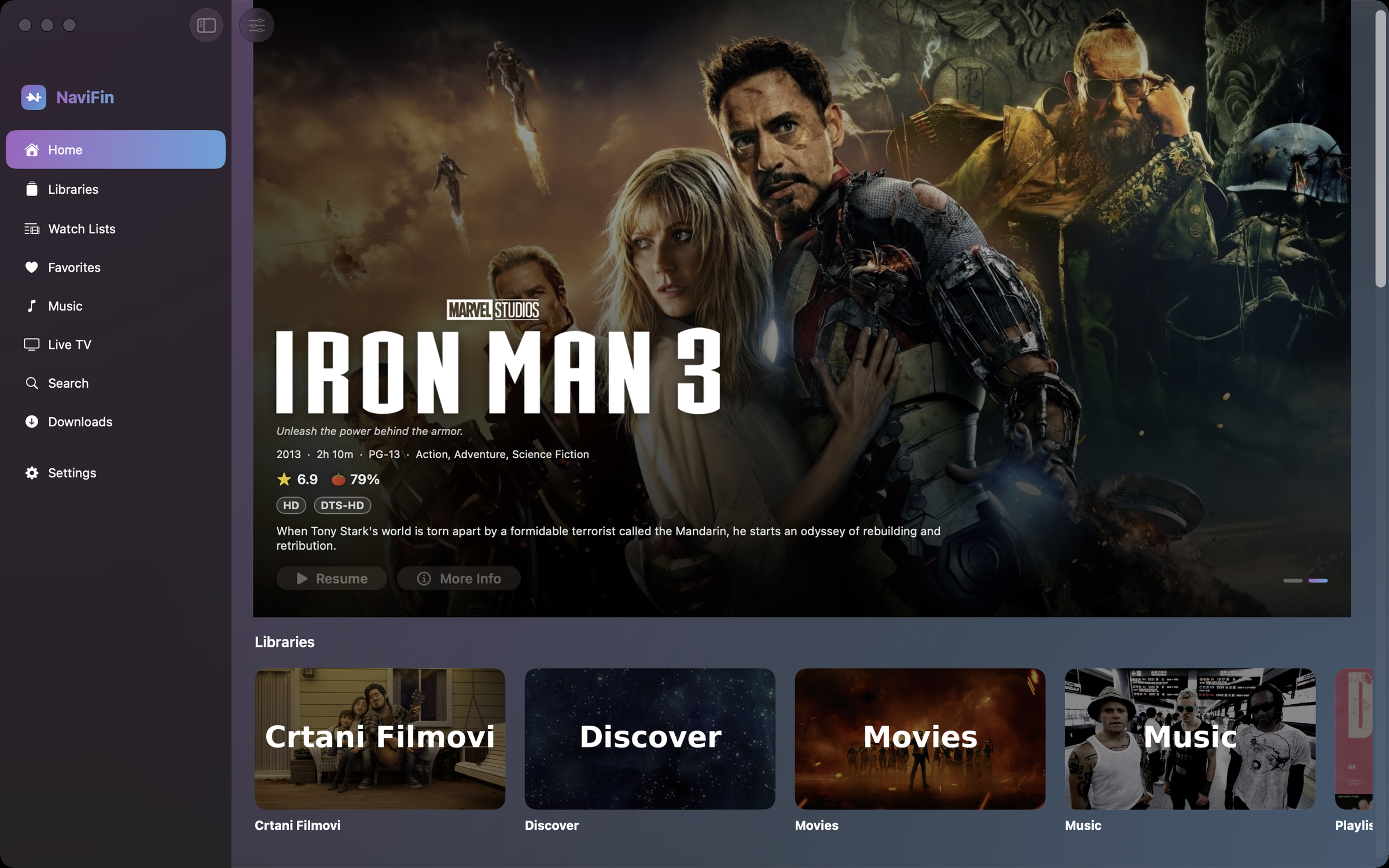
NaviFin Home on Mac: a single-window app with a glass sidebar, a cinematic hero, and library shelves.

Short answer

Why NaviFin on the Mac?

Every section is one keystroke away.

Command 1 to 8 jump to Home, Libraries, Favorites, Music, Live TV, Search, Downloads and Settings. Command F finds, Command P plays or pauses, Command Option Left and Right skip, Command Shift S and R toggle shuffle and repeat, Command Shift B shows or hides the music bar, Command Shift M opens the mini player, Command N opens another window, and Escape closes the player.

Play in the window, or keep working.

Playback lives inside the app window, goes full screen, or pops out into Picture in Picture so a film keeps running while you work. The hybrid AVPlayer + VLC engine plays MKV, HEVC, surround audio and embedded or external subtitles without asking the server to transcode.

Downloads on the Mac too.

A Downloads section (Command 7) keeps movies and episodes on the machine for a flight, and watch state syncs back to your Jellyfin server when you reconnect. Books open in the built-in reader.

A window that can go see-through.

A transparency setting lets the desktop show through the window, Frosted Glass style, and a set of themes (Aurora, Glass Nebula, a deep navy) with an Atmosphere slider tune how much glow the interface carries. Home Screen style widgets sit on the Mac desktop, and more than one Jellyfin server switches from the sidebar.
  • macOS 26+

    Apple Silicon & Intel

  • 0 SDKs

    No analytics. No trackers.

  • One window

    Glass sidebar · in-window playback

  • $6.99 once

    Price · Universal Purchase

Every screen

A native Mac app that looks and behaves like one.

A single-window app with a glass sidebar, keyboard shortcuts, in-window playback, and Picture in Picture. Every detail of the macOS platform considered: not a port, not a compromise.

NaviFin Home on Mac with a glass sidebar and a cinematic hero

01 / Home

Glass sidebar, cinematic home.

The glass sidebar gives you instant access to your Jellyfin libraries: Movies, Shows, Music, and more. The main area opens on a cinematic hero with Continue Watching and your latest titles below. Multi-server? Switch between Jellyfin servers from the sidebar.

NaviFin in-window playback on Mac with Picture in Picture

02 / Playback

In-window or Picture in Picture.

Play in the window, go full screen, or pop into Picture in Picture and keep working. The hybrid AVPlayer + VLC engine plays anything: MKV, HEVC, surround, embedded or external subtitles. Pick subtitle and audio tracks, change speed, and Skip Intro.

NaviFin detail page and keyboard shortcuts on Mac

03 / Keyboard & detail

Shortcuts, cinematic detail pages, Next Up.

Drive the whole app from the keyboard. Every movie and show opens a cinematic detail page with cast, crew, and More Like This. Next Up auto-advances the episode, and your watch state syncs across every device through your server.

All screenshots

Every screen in one place.

Home

Home: glass sidebar

Before you buy

Frequently asked questions

How do I install NaviFin on my Mac?

Open the App Store on the Mac, running macOS 26 or later, and search for NaviFin. Bought it on an iPhone, iPad or Apple TV with the same Apple ID? Then it is a free download on the Mac: it is one Universal Purchase.

Does NaviFin run on Intel Macs?

Yes. The Mac app is a universal binary for Apple Silicon and Intel. It needs macOS 26 or later.

Is the Mac app native, or Electron?

Native SwiftUI. No Electron and no Catalyst: a single-window app with a glass sidebar, keyboard shortcuts for every section, in-window playback and Picture in Picture.

What server does NaviFin need?

Your own Jellyfin server, version 10.9 or later, on a LAN, over Tailscale, or behind a reverse proxy, Cloudflare Access included. NaviFin is an independent client and does not work with Plex or Emby.

How much does it cost, and does one purchase cover the Mac?

$6.99 once. One Universal Purchase covers Mac, Apple TV, iPad and iPhone, with no subscription and no in-app purchases.

Can I download films to the Mac for offline viewing?

Yes. The Downloads section (Command 7) keeps movies and episodes on the Mac, and your watch state syncs back to the server when you reconnect.

Price

One purchase. Every device.

$6.99

Mac, Apple TV, iPhone, iPad. One purchase, forever. No subscription, no in-app purchases, no ads.